What vulnerability scanners look for: 12,000 requests to a site in 42 hours
 Marko Fedorenko
In early November I went through this site’s access logs and counted the requests from vulnerability scanners. From 4 to 6 November, over 41.7 hours, there were 12,247 of them from 58 IP addresses. That is about 5 requests a minute, day and night. Scanners do not care what runs on a site, because they work through a ready-made list of paths on every domain.
Below is a breakdown of those logs: what scanners look for, how they disguise themselves and how they find addresses that were never published. Some figures come from a wider period, and each one says which. At the end there is a checklist for anyone launching projects with Cursor, Claude Code or Lovable.
How many requests do vulnerability scanners make, and what do they look for?
In 41.7 hours scanners made 12,247 requests, and they were most interested in WordPress, .env and cloud service keys. The table groups these requests by target. Some requests did not fit any category, so the total is lower.
| What they looked for | Requests | Example paths |
|---|---|---|
| WordPress and PHP | 4,707 | /wp-login.php, /xmlrpc.php, /wp-admin/ |
.env files | 4,509 | /.env, /.env.production, /backend/.env |
| Cloud service keys | 882 | /.aws/credentials, /serviceAccountKey.json |
| Docker and hosting configs | 719 | /docker-compose.yml, /netlify.toml, /vercel.json |
The .git folder | 261 | /.git/config, /.git/HEAD |
| Vite, Next.js, Astro service files | 254 | /.vite/manifest.json, /.next/.env |
| GraphQL | 200 | /graphql |
| Directory traversal | 79 | /....//....//.env, /proc/self/environ |
WordPress leads because it is the most widely used CMS in the world. For a scanner, sending an extra request is easier than detecting the CMS. .env is only slightly behind. It is the most rewarding target: one request, and if the file is open, the response contains ready-to-use passwords and keys.
Why do scanners want the .env file, and why is it a risk for vibe coders?
Scanners look for .env because it holds the project’s secrets: OpenAI or Anthropic keys, the database password, a Stripe token. AI assistants usually create it at the very start of a project. The problem appears at deploy time. If the file ends up in a folder the web server serves, anyone can download it.
The logs contain 219 different paths to this file. Among them are /.env.local, /api/.env, /static//app/.env and /admin%2F.env. The last two target servers that mishandle double slashes or encoded characters. These lists appear to be built around typical project structures.
Scanners also look specifically for AI service keys. The logs show requests to /.env.openai, /.env.anthropic and /llm/.env. On 1 November a single IP address tried 14 paths resembling the AWS Bedrock API within 5 seconds: /api/bedrock, /api/v1/foundation-models, /api/inference-profiles. A stolen model key is easy to turn into money, because the key owner pays for the generation.
Why do scanners request the .astro, .next and .vite folders?
These requests check whether the web server serves the whole project folder instead of the build folder. Scanners requested /.vite/manifest.json 87 times, /.astro/manifest.json 58 times and /.next/.env 52 times. The .astro and .next folders sit in the project root, next to .env and package.json. They are reachable from the internet only with exactly this configuration mistake.
The right setup is simple. The web server points at dist, build or out, and the source code and .env live outside that folder. The .vite/manifest.json file can legitimately appear in a build when build.manifest is enabled. It holds no secrets, but it reveals the stack and module names.
What can someone get from an open .git folder?
From an open .git folder you can download the entire repository along with its commit history. Ready-made tools such as git-dumper do this. Scanners requested this folder 261 times, including /.git/config and /.git/HEAD. A key that was once committed and later deleted stays in that history. So after a leak the key is revoked and a new one issued, as GitHub advises in its guide.
How do scanners pose as Googlebot and AI bots?
Scanners use the User-Agent of well-known crawlers, and 31% of their requests did so. They most often claimed to be ClaudeBot (576 times), Googlebot (472), GPTBot (270), OAI-SearchBot (263) and Perplexity-User (255). The likely reasoning is that site owners are reluctant to block search engine and AI company bots. On 5 November one address called itself 15 different bots within an hour, from Googlebot to Baiduspider.
The IP address gives the fake away immediately. Of 797 requests with a Googlebot User-Agent on 1–4 November, only about 170 came from addresses that actually belong to Google’s crawler. The rest came from cloud machines and looked for .env. In the same period, among the 40 most active scanner addresses, Google LLC networks produced 61% of requests and Microsoft networks another 33%. Scanners run on rented virtual machines in the same clouds everyone uses.
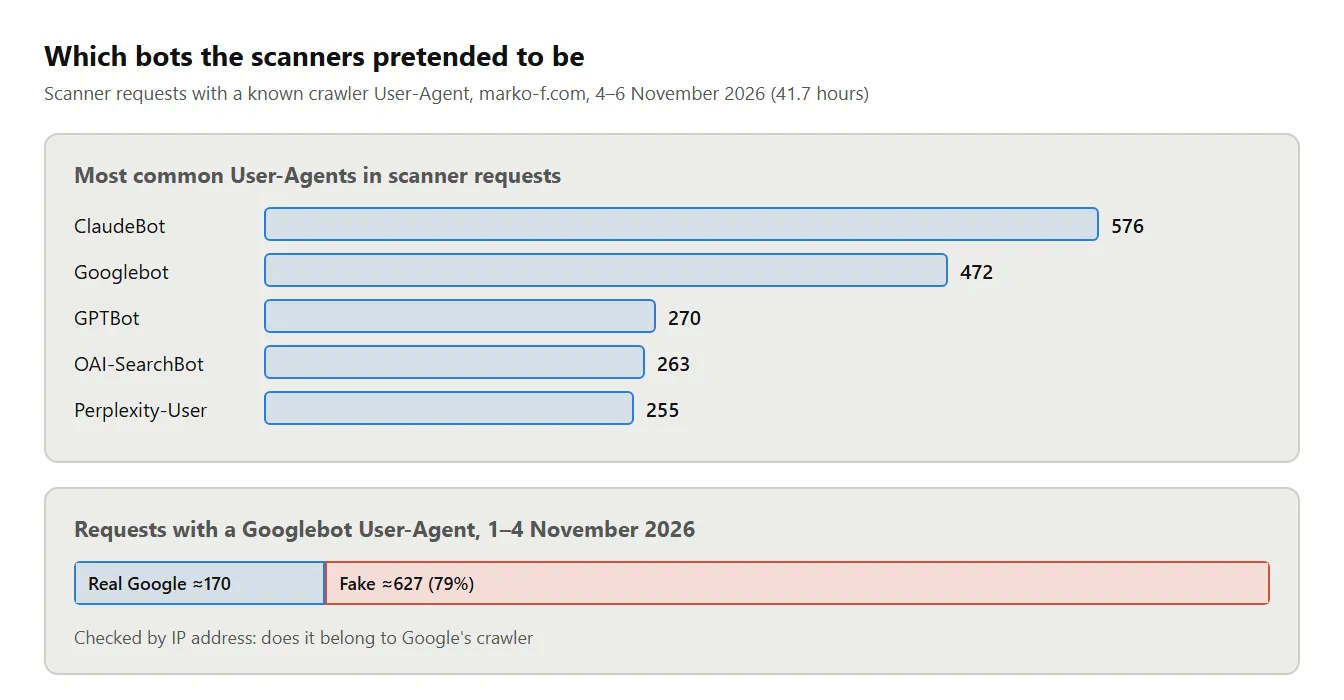
The check takes two commands. First a reverse DNS lookup for the IP, then a forward lookup for the resulting name. Real Google crawlers have a name in the googlebot.com, google.com or googleusercontent.com domains, and that name points back to the same IP.
host 66.249.66.1
# 1.66.249.66.in-addr.arpa domain name pointer crawl-66-249-66-1.googlebot.com.
host crawl-66-249-66-1.googlebot.com
# crawl-66-249-66-1.googlebot.com has address 66.249.66.1
If the domain is different or the IP does not match, it is not Google. For large logs it is easier to compare addresses against the JSON IP lists that Google and OpenAI publish. The takeaway for SEO analytics is the same: a “bots” segment built on User-Agent alone contains a lot of junk.
How do scanners find subdomains that were never published?
Most likely, scanners take such subdomains from Certificate Transparency logs. I have a subdomain I never linked to anywhere. On 1–4 November it still received 5,159 requests.
These logs are public: every publicly trusted TLS certificate, including those from Let’s Encrypt, goes into them at issuance. Scanners watch them and add new domains to their lists. So counting on nobody knowing your project’s address does not work. A new subdomain can get its first scanners before its first visitors.
What threatens the server besides requests to the site?
Servers are constantly targeted with SSH password guessing. Over 7 days the server logged 97,491 failed login attempts. 65,661 of them were for the root user. Next on the list were admin (2,285 attempts), ubuntu (1,771), user (1,136), deploy (758) and test (587). The most active address made 15,638 attempts.
The second threat comes from how a Node.js app is usually run. It often sits behind nginx, which accepts requests from the internet and passes them to the app inside the server. If you do not pass an address to listen(), the app opens its port to everyone, including the internet. Then anyone can reach it directly, bypassing nginx and all its restrictions. On a laptop there is no visible difference, so this mistake is easy to miss.
Rate limits suffer the most. The app learns the visitor’s IP from the X-Forwarded-For header that nginx adds. With a direct request, anyone can write this header themselves and put a new address in it every time. The app will treat each such request as a new visitor, and the limit stops working.
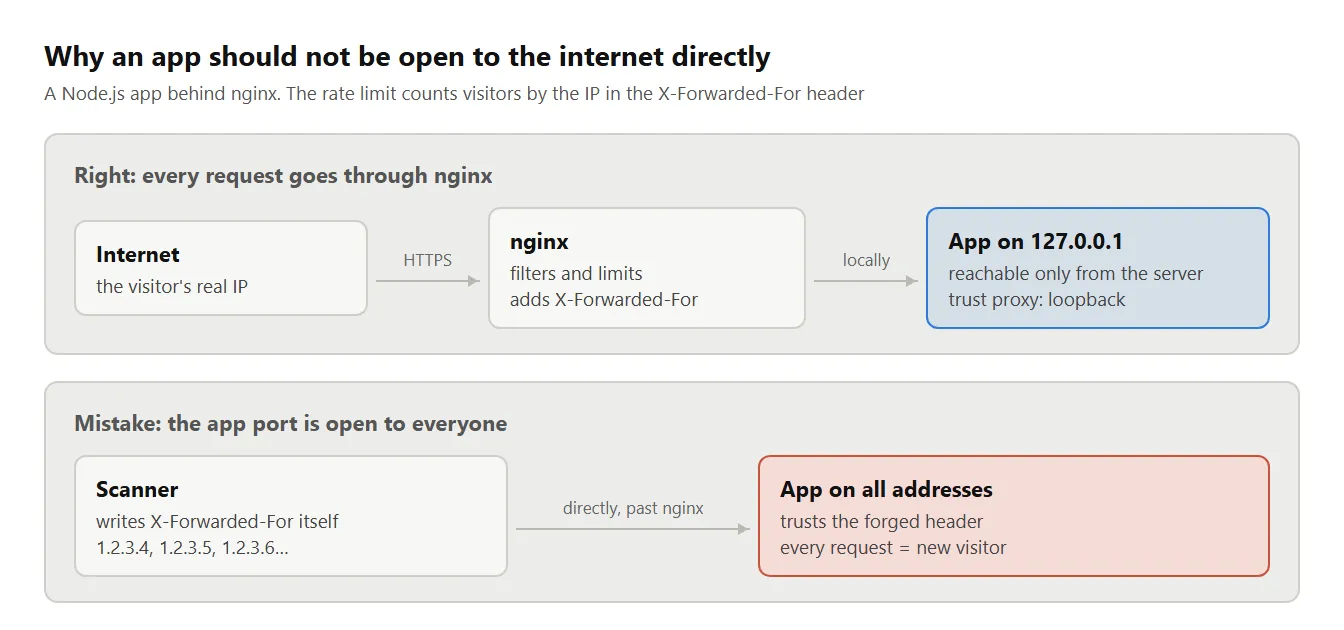
The protection has two steps. First, run the app on 127.0.0.1, so it is reachable only from inside the server. Second, in Express set trust proxy to loopback. With this setting the app trusts the header only when nginx on the same server passed the request.
What should you check before launching a project?
Go through the 10 items below before launch, and most of them take a few minutes. Each item closes one of the targets visible in the logs above.
- Open
https://your-site/.envandhttps://your-site/.git/HEAD. Both should return 404 or nothing. - Point the web server at the build folder (
dist,build,out), never at the project root. - Do not put secrets in variables prefixed with
VITE_orNEXT_PUBLIC_. Vite and Next.js embed these variables in the JavaScript the browser receives. - Check whether source maps are published in production. Open any JS file of the site in a browser and add
.mapto the URL. - Bind the app to
127.0.0.1if nginx or another proxy sits in front of it. Leave only ports 22, 80 and 443 open in the firewall. - Set
trust proxyin Express toloopbackor to the specific proxy address. - Log in to the server with an SSH key and disable password login. Fail2ban will block addresses that guess passwords.
- If a key ever made it into git, revoke it and issue a new one.
- Set a spending limit on OpenAI, Anthropic and other paid API keys. If a key does leak, the bill will not grow without bound.
- Do not trust the User-Agent. Verify bots by IP and reverse DNS.
Scanners are not going away, and there is no need to get rid of them. It is enough that they get nothing valuable in response.
Sources
All figures in this article come from this site’s logs. The behaviour of Node.js, Express, Vite and Next.js is described from their documentation. Links below.
- marko-f.com logs for 28 October – 6 November 2026. IP owners identified via ipinfo.io.
- Node.js,
server.listen()documentation: without a host the server accepts connections on all addresses. https://nodejs.org/api/net.html#serverlisten - Express, “Express behind proxies”:
trust proxyvalues, includingloopback. https://expressjs.com/en/guide/behind-proxies.html - Vite, “Env Variables and Modes”: variables prefixed with
VITE_end up in client code. https://vite.dev/guide/env-and-mode - Vite, the
build.manifestoption. https://vite.dev/config/build-options#build-manifest - Next.js, “Environment Variables”:
NEXT_PUBLIC_variables are embedded in browser JavaScript. https://nextjs.org/docs/app/guides/environment-variables - GitHub Docs, “Removing sensitive data from a repository”. https://docs.github.com/en/authentication/keeping-your-account-and-data-secure/removing-sensitive-data-from-a-repository
- Google Search Central, “Verifying Googlebot and other Google crawlers”. https://developers.google.com/search/docs/crawling-indexing/verifying-googlebot
- OpenAI, “Overview of OpenAI Crawlers”: User-Agents and bot IP lists. https://platform.openai.com/docs/bots
- W3Techs, “Usage statistics of content management systems”. https://w3techs.com/technologies/overview/content_management
- RFC 6962, Certificate Transparency. https://www.rfc-editor.org/rfc/rfc6962
If you check your site against this checklist and find something interesting in your logs, write to me. Data like this is rarely public.
See more from marko-f.com in your Google Search results.